The laptop market has evolved far beyond the simple choice between “PC or Mac.” Today, laptops are defined by their architecture, form factor, and specific use cases. With the rise of dedicated Neural Processing Units (NPUs) for local artificial intelligence and displays that look better than most home TVs, finding the right machine requires knowing exactly what category fits your lifestyle.
Here is a comprehensive breakdown of the major laptop types available today to help you cut through the marketing noise.
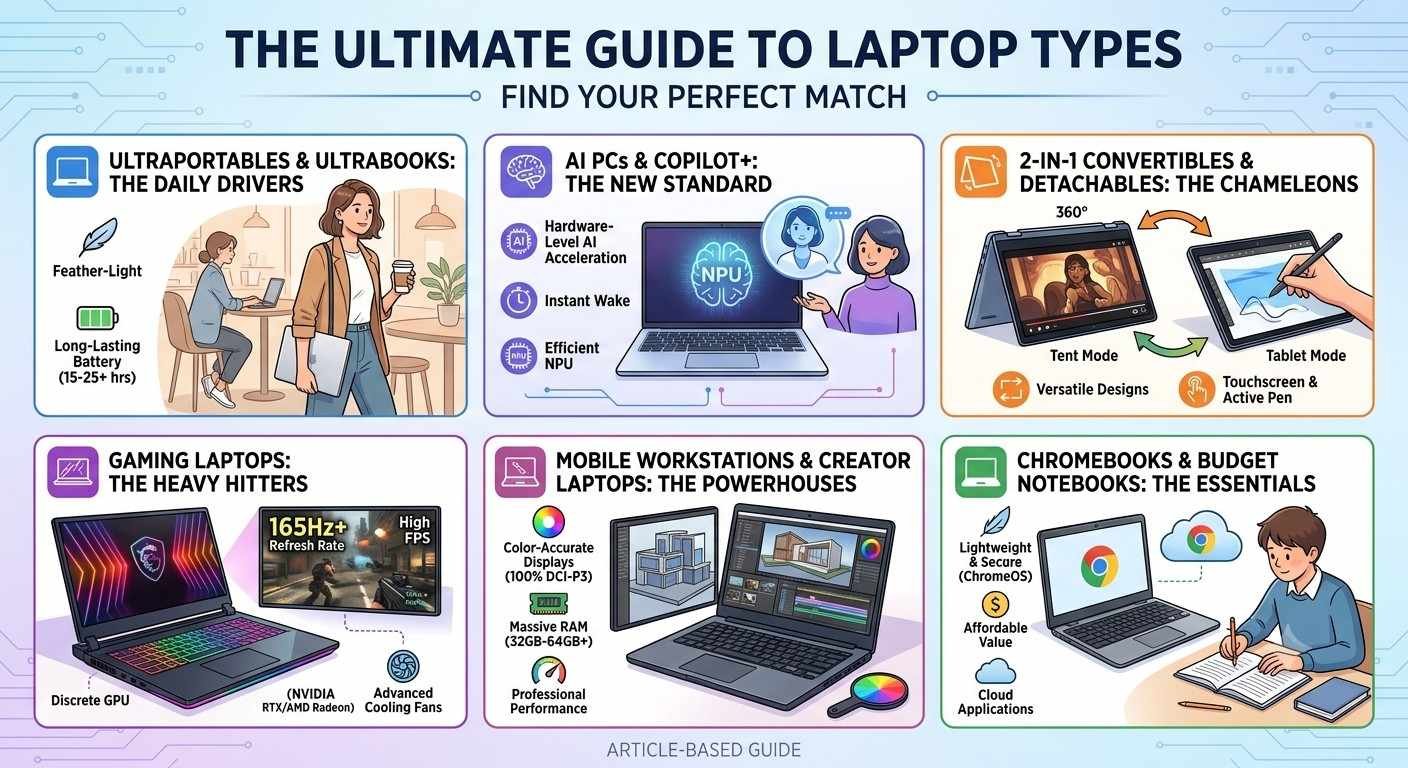
1. Ultraportables & Ultrabooks (The Daily Drivers)
If your primary requirements are portability, sleek aesthetics, and long-lasting battery life, this is your category. Ultraportables are designed for professionals, students, and travelers who need a reliable machine that won’t weigh down a backpack.
- Key Features: Razor-thin profiles (usually under 3 pounds), premium metal chassis (aluminum or carbon fiber), vibrant OLED or Retina displays, and fanless or near-silent cooling.
- Battery Life: Exceptional, frequently stretching between 15 to 25+ hours of continuous real-world use.
- Prime Examples: Apple MacBook Air, Asus Zenbook S14, and the Dell XPS 14.
2. AI PCs & Copilot+ Laptops (The New Standard)
This category represents the newest shift in personal computing. AI PCs are equipped with advanced processors (like Intel Core Ultra, AMD Ryzen AI, or Snapdragon X Elite) featuring a dedicated NPU capable of running complex AI models right on the device without relying on the cloud.
- Key Features: Hardware-level AI acceleration, dedicated OS integration keys, instant wake times, and groundbreaking power efficiency.
- Best For: Multitaskers, future-proof shoppers, and professionals who utilize live translations, automated video editing, or real-time productivity assistance.
- Prime Examples: HP OmniBook 5 AI PC, Acer Swift 16 AI, and Microsoft Surface Laptop.
3. 2-in-1 Convertibles & Detachables (The Chameleons)
Why choose between a tablet and a laptop when you can have both? 2-in-1 devices feature flexible designs that adapt to how you work, whether you’re typing an essay or sketching a design.
- Convertibles: Features a 360-degree hinge allowing the keyboard to flip entirely behind the screen.
- Detachables: A tablet first, featuring a fully removable keyboard deck.
- Best For: Digital artists, students who prefer handwritten notes, and frequent travelers who watch media in tight spaces (like airplane trays).
- Prime Examples: Lenovo Yoga 9i, Microsoft Surface Pro, and Asus ProArt PZ13.
4. Gaming Laptops (The Heavy Hitters)
Gaming laptops prioritize raw graphical horsepower and extreme refresh rates over portability and battery endurance. They are essentially portable desktop rigs packed with discrete graphics cards.
- Key Features: Dedicated GPUs (such as the NVIDIA RTX or AMD Radeon series), high-refresh-rate displays (144Hz to 240Hz+), advanced cooling fans, and RGB customizable keyboards.
- The Trade-off: They are significantly heavier, run hotter, and their battery life rarely exceeds a few hours under load.
- Prime Examples: Alienware 16X Aurora, MSI Raider, and HP Victus (for budget-conscious gamers).
5. Mobile Workstations & Creator Laptops (The Powerhouses)
Often confused with gaming laptops due to their high specs, creator laptops and workstations are engineered specifically for stability, color accuracy, and massive computational tasks like 3D rendering, scientific calculations, and 4K/8K video editing.
- Key Features: Factory-calibrated, color-accurate displays (often with 100% DCI-P3 coverage), massive RAM capacities (32GB to 64GB+), and enterprise-grade security architecture.
- Best For: Architects, engineers, professional video editors, and software developers.
- Prime Examples: Apple MacBook Pro (M-Series Max chips), HP ZBook, and Dell Pro Max Workstations.
6. Chromebooks & Budget Notebooks (The Essentials)
For users who primarily work within a web browser or only need a machine for basic administration, budget laptops and Chromebooks offer incredible value without forcing you to pay for performance you won’t use.
- Chromebooks: Run on Google’s lightweight ChromeOS. They rely heavily on cloud applications, making them fast, secure, and incredibly cheap to produce.
- Budget Windows/Mac Laptops: Stripped-down versions of standard laptops that use efficient, entry-level processors to keep costs low.
- Prime Examples: Acer Chromebook Plus Spin, Apple MacBook Neo, and Acer Aspire AI series.
Laptop Categories At a Glance
| Laptop Type | Primary Strengths | Ideal User | Target Specs to Aim For |
| Ultraportable | Lightweight, Elite Battery | Commuters, General Users | 16GB RAM / 512GB SSD / Integrated Graphics |
| AI PC / Copilot+ | On-device AI, Efficiency | Professionals, Tech Enthusiasts | 16GB+ RAM / 40+ TOPS NPU / OLED Screen |
| 2-in-1 / Tablet | Versatility, Stylus Support | Artists, Students, Presenters | Touchscreen / Active Pen Included |
| Gaming | Extreme Graphics, Max Power | Gamers, 3D Hobbyists | Dedicated GPU (RTX 40/50 series) / 165Hz Display |
| Workstation | Processing Power, Accuracy | Engineers, Video Editors | 32GB+ RAM / Color-Calibrated Display |
| Chromebook / Budget | Price, Simplicity | Kids, Casual Browsers | 8GB RAM / ChromeOS or Entry Windows |
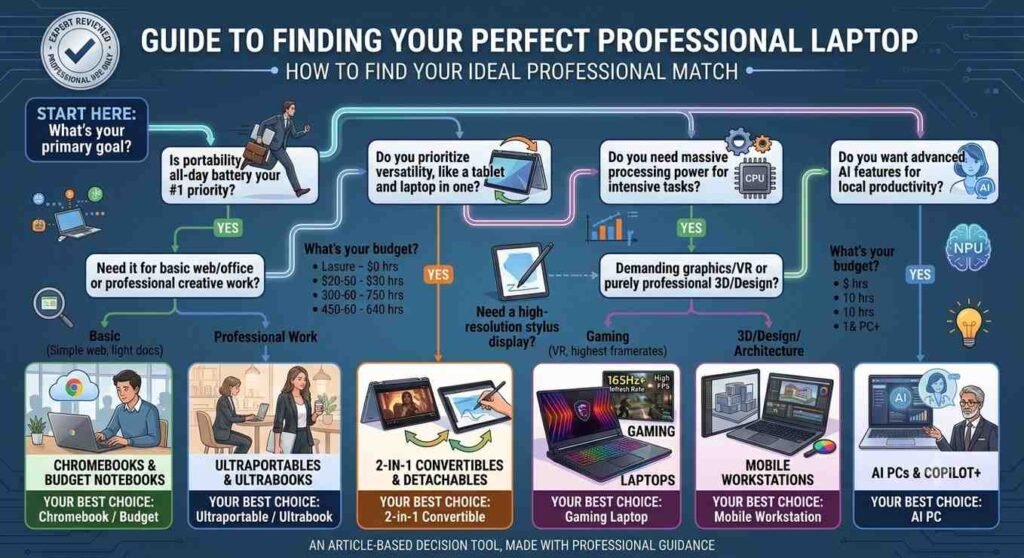
Which Form Factor is Right for You?
Before pulling the trigger on a purchase, sit down and map out your typical day. If you rarely leave your desk, a slightly heavier Gaming Laptop or Workstation gives you the most bang for your buck. However, if your day involves moving between coffee shops, classrooms, or boardrooms, prioritizing a lightweight Ultraportable or an AI PC with a massive battery runtime will drastically improve your computing experience.